Creating Service
Unlock your creativity by offering various creative services to your clients across different service categories. 🎨
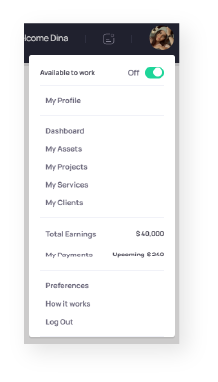
To create a service, simply navigate to your dashboard and select “My Services”.

Next, click on the “Add Service” button.

A popup will appear where you can enter the details of your service.
When creating a service, make sure to provide as much detail as possible. Include what you can and cannot do, any personal terms and conditions, and additional costs.
- Choose a catchy title that reflects your service.
- Provide a detailed description of what your service includes and excludes.
- Mention any additional costs and your terms and conditions.
- Set a reasonable price for your service. Remember, you can always quote additional costs to meet client requirements.
- Enter the price for your service. Note: Exclusive assets typically have higher prices.
- Upload an eye-catching cover photo for your service.
- Select the category and sub-category your service belongs to, and add search tags for better visibility.
- Click “Add Service” and voilà! Get ready to receive offers. 😉
